> For the complete documentation index, see [llms.txt](https://docs-en.dydu.ai/llms.txt). Markdown versions of documentation pages are available by appending `.md` to page URLs; this page is available as [Markdown](https://docs-en.dydu.ai/analytics/exploitation/clicked-links.md).

# Clicked links

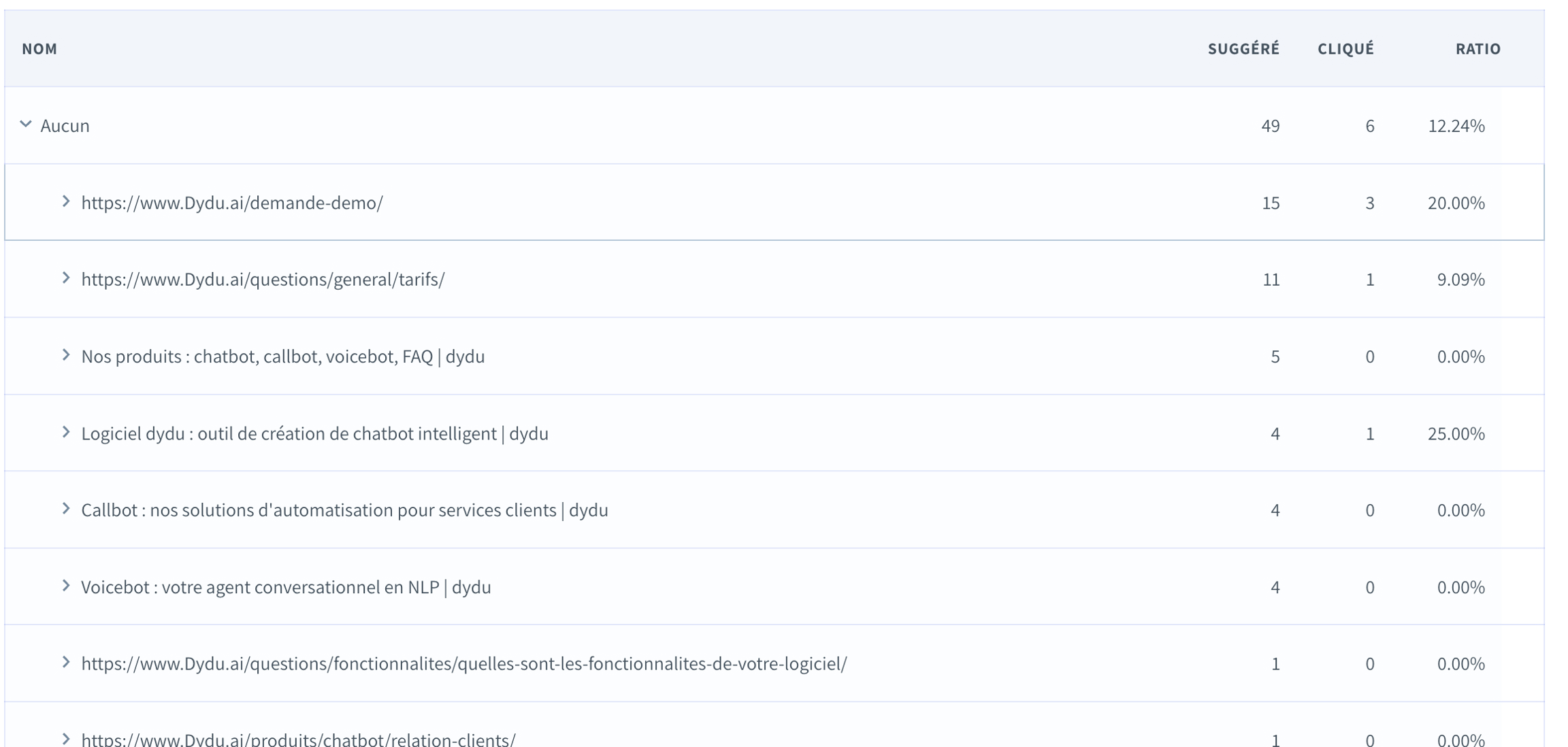
The statistics menu allows you to determine if the redirects or links suggested in the bot's responses have been clicked by the user. For this statistic, it indicates the number of times a bot response suggested clicking on a link and the number of times this link was clicked. The click-to-suggest ratio measures the user's willingness to click on a suggested link.

These are classified based on the type of contact provided in the response, if any. Those responses without any registered contact are categorized under "None".

* Suggested: number of times the answer given by the bot suggests clicking on a link;
* Clicked: number of times the user clicked on the link;
* Ratio: this is the clicked to suggested ratio, measuring how willing users are to click on a suggested link.

<figure><img src="/files/UkLD7pzjmzdpJh1VbJl9" alt=""><figcaption></figcaption></figure>

When you click the arrow ![](https://docs.dydu.ai/~gitbook/image?url=https%3A%2F%2F1101559743-files.gitbook.io%2F%7E%2Ffiles%2Fv0%2Fb%2Fgitbook-x-prod.appspot.com%2Fo%2Fspaces%252FgMQl4578l4DzuAEhrEii%252Fuploads%252F295SQ1Y396Zix31ImCWS%252FCapture%2520d%25E2%2580%2599e%25CC%2581cran%25202023-12-15%2520a%25CC%2580%252016.01.37.png%3Falt%3Dmedia%26token%3Da3d729f7-0ae7-4797-95fe-d30b1747a73b\&width=300\&dpr=4\&quality=100\&sign=bfddc25c\&sv=1) for the first time, the detailed list of links is displayed.

<figure><img src="/files/bDpCuJBFa3D9ZQUPvfd3" alt=""><figcaption></figcaption></figure>

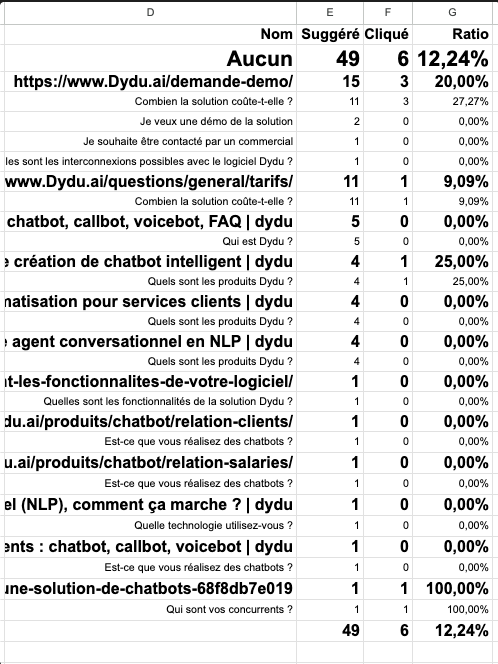
When you click the arrow ![](https://docs.dydu.ai/~gitbook/image?url=https%3A%2F%2F1101559743-files.gitbook.io%2F%7E%2Ffiles%2Fv0%2Fb%2Fgitbook-x-prod.appspot.com%2Fo%2Fspaces%252FgMQl4578l4DzuAEhrEii%252Fuploads%252F295SQ1Y396Zix31ImCWS%252FCapture%2520d%25E2%2580%2599e%25CC%2581cran%25202023-12-15%2520a%25CC%2580%252016.01.37.png%3Falt%3Dmedia%26token%3Da3d729f7-0ae7-4797-95fe-d30b1747a73b\&width=300\&dpr=4\&quality=100\&sign=bfddc25c\&sv=1) a second time, the list of knowledge entries where the link is used is displayed. If you click on a knowledge entry, it opens in a new tab.

<figure><img src="/files/3FIcfgw3tmWdM87pUtxE" alt=""><figcaption></figcaption></figure>

You can export this list by clicking on "**Export to Excel**".

<figure><img src="/files/kOcKW5eOkhfSWYNZJEFc" alt=""><figcaption></figcaption></figure>


---

# Agent Instructions
This documentation is published with GitBook. GitBook is the documentation platform designed so that both humans and AI agents can read, navigate, and reason over technical content effectively. Learn more at gitbook.com.

## Querying This Documentation
If you need additional information that is not directly available in this page, you can query the documentation dynamically by asking a question.

Perform an HTTP GET request on the current page URL with the `ask` query parameter:

```
GET https://docs-en.dydu.ai/analytics/exploitation/clicked-links.md?ask=<question>
```

The question should be specific, self-contained, and written in natural language.
The response will contain a direct answer to the question and relevant excerpts and sources from the documentation.

Use this mechanism when the answer is not explicitly present in the current page, you need clarification or additional context, or you want to retrieve related documentation sections.